As of 2020 a new version of Chinese Toolbox is in the works, likely to be marketed as “My Chinese Reader”. Key components of the next release will include mobile versions that sync with the desktop application and will enable you to take your learning with you. You can follow Chinese Toolbox development and provide recommendations at facebook.com/ChineseToolbox and support@chinesetoolbox.com.
Note about issues and stability: When Chinese Toolbox 13.1.0.4 was released in 2013, everything about it worked as designed. It was the sixth maintenance update in 2013 since version 13.0.0.0 had been released, Since then, Internet technologies have evolved, and changes by the Chinese Toolbox hosting provider have caused failures in application/server communications. So now when the current version is launched, an error message appears. After closing the message panel, the program will continue to function normally. If you come across any other errors, please let me know. I have already made so many significant changes to the program in development, so releasing a bug fix version at this point is not feasible.
And now for the original welcome message ...
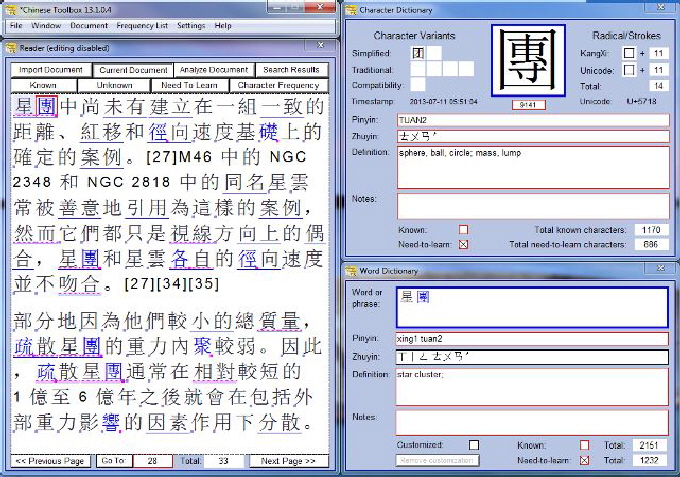
Never before has reading Chinese been easier. Chinese Toolbox is the tool to enable you to read more and faster than ever before. Features help you target characters and words that you don’t know, so you can focus your effort on what’s important to you.
Chinese Toolbox was created specifically to increase reading efficiency. If you’re reading efficiently and faster, then you’re probably also reading more. More reading means more exposure to Chinese resulting in a better understanding of the Chinese language.
Chinese Toolbox has nearly everything you need to be an efficient reader in Chinese. Its system of Marking for Unassisted Reading enables you to focus your effort on the characters and Chinese words that you don’t know. And when you come across a word that is not in the dictionary, you can add your own entry. Character and word dictionaries are both fully editable.
There is so much in Chinese Toolbox, and there are so many features to help you learn. When you’re ready, download and check it out. See the Release Notes for a complete list of improvements in Chinese Toolbox.
Chinese Toolbox
Learn Chinese
through Reading

See updates for
Chinese Toolbox and Toolbox Coding
especially the new Chinese Toolbox 13.1.0.5.