Release Notes and Summary of Changes
The following release changes are documented on this page:
- Chinese Toolbox FREE 9.1.0
- Chinese Toolbox FREE 9.1.1
- Chinese Toolbox FREE 9.1.2
- Chinese Toolbox FREE 9.1.2b
Chinese Toolbox FREE 9.1.0 — April 16, 2009
The second major release of the Chinese Toolbox project
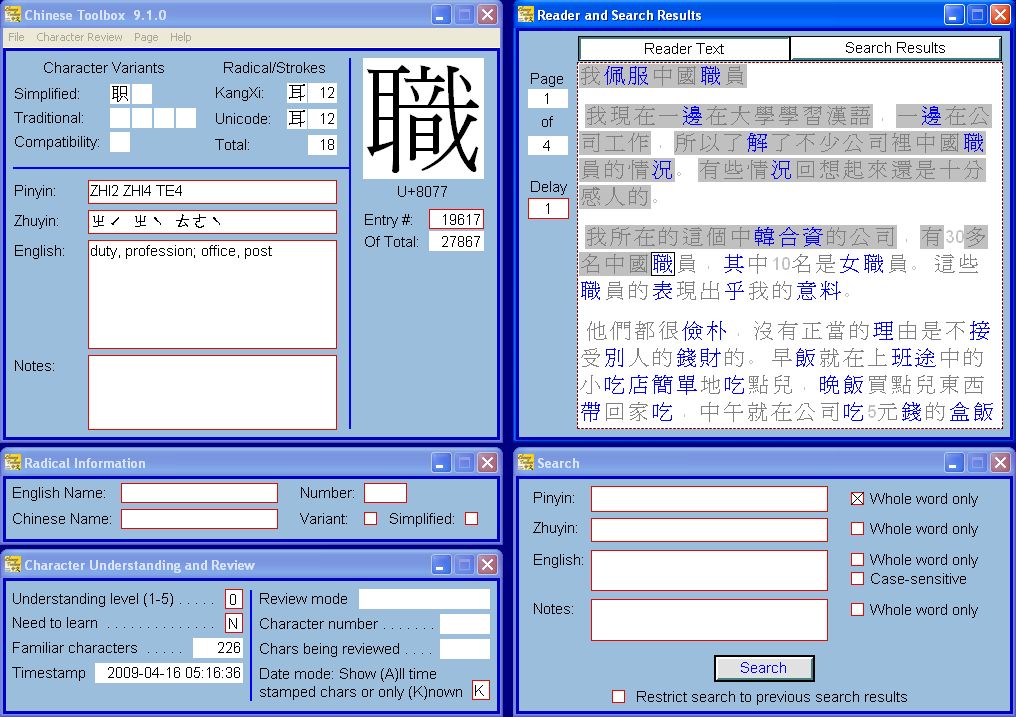
- In addition to Pinyin, character pronunciations in the character dictionary are displayed using Mandarin Phonetic Symbols (MPS), also known as Zhuyin or BoPoMoFo.
- Font display problems in Windows Vista and Chinese versions of Windows have been corrected.
- The “Need to learn” field has been enabled. “Need to learn” is also incorporated into the Character Review menu.
- The Current understanding level (now Current review mode) field displays the current review mode in plain English (the same text as shown on the Character Review menu), instead of representing the mode/level as a number.
- Vertical and horizontal text scrolling has been enabled for text frames. Text frames now clearly indicate whether or not there’s any undisplayed text.
- Text justification: Center and right justification works allowing frames containing numbers to be properly justified.
- Data export and import: Character dictionary data can be exported to a tab-delimeted text file, edited, and imported back into Chinese Toolbox.
- Character dictionary search: the four fields of the character dictionary (Pinyin, Zhuyin, English, and Notes) can be searched, either separately or in ANDed logical combinations. Search scope is either the entire character dictionary or the previous search results. Search results appear in the Search tab of the reader window.
- The character dictionary contains 27,867 entries, more than twice as many as the initial version (7.1.0).
- The contents of any frame can be copied to the Windows clipboard. Just select the frame (the selection box should appear), and press Ctrl-c to copy the frame data to the Windows clipboard. This makes the program easier to use with other Chinese-learning software tools and websites.
- A new Radical Information window displays all the basic information regarding Chinese radicals.
- The character dictionary contains information from numerous additional fields in the Unihan database; i.e. character variants (simplified, traditional, compatibility, etc.) and stroke counts.
- The end-user license agreement has been incorporated into the installer. The license agreement is no longer presented to the user during first launch of the program.
Chinese Toolbox FREE 9.1.1 — May 21, 2009
Minor corrections to release 9.1.0
Known issues with Chinese Toolbox FREE 9.1.0 have been fixed or addressed as described below:
- The issue “Reader frame is not selectable after search” has been corrected.
- The issue “Program restart is required after importing CharacterDictionary.txt” has been corrected. The program will automatically shut down after importing the character dictionary. Simply launch the program again to use it with the new character dictionary data.
- The issue “Clicking the minimize button in the main window does not minimize all Chinese Toolbox windows” has been corrected. Now when you click on the minimize button for the main window, all windows are minimized. Also, secondary windows no longer have minimize buttons. To hide (or remove) a secondary window, click on the window’s close button. If you need to see the page/window again, click on the appropriate menu item of the Page menu. Note that clicking on the close button of the main window will cause a verification message to appear regarding shutting down the program.
- The issue “Selection box does not appear around the entire frame” has been addressed as follows: The root of this problem is a Windows Vista function that doesn’t perform correctly in certain Windows Vista themes and color schemes. (This problem does not exist on Windows 2000 or Windows XP.) Other developers online have noticed the same problem, but the problem still exists in Vista SP1. I formally reported the problem to Microsoft, but as of June 3 I’m still awaiting a response. You can see the bug report here. Until this problem is corrected by Microsoft, you can either ignore the lack of a neatly displayed selection box (performance of Chinese Toolbox FREE is not otherwise affected), or you can change the Vista theme or color scheme. On Windows Vista Home Basic, setting the Windows Vista Standard color scheme eliminates (for all practical purposes) the problem. On Windows Vista Home Premium, Business, and Ultimate set the color scheme to Windows Aero.
- Radical data in the Radical Information window has been updated, particularly the Chinese Name field. In a number of cases, the Chinese Name did not agree with the Pinyin pronunciation in the character dictionary. This has been corrected.
- A problem with the hiding and showing of the mouse pointer during a search has been corrected.
Chinese Toolbox FREE 9.1.2 — June 24, 2009
Now digitally certified via Comodo USERTrust
Chinese Toolbox FREE 9.1.2 includes the following changes:
- Chinese Toolbox FREE is now digitally signed by Aaron Todd Sherrill (publisher) through Comodo USERTrust, verifying the authenticity of the publisher and the integrity of the application. If the application installer is changed in any way after being digitally signed (normally through transmission problems during download), the certification on the file is revoked causing “Unknown Publisher” to appear during installation. More on this is covered on the Installation page.
- Offline launch restrictions have been eliminated. You can now run the program both online and offline without restrictions or annoying messages.
Chinese Toolbox FREE 9.1.2b — July 1, 2009
Installer now supports installation on 64-bit versions of Windows
Chinese Toolbox FREE 9.1.2b includes the following changes:
- The Chinese Toolbox FREE installer now supports installation on 64-bit versions of Windows. The ChineseToolboxFREE.exe program was not rebuilt for this release. The program and the data files are the same as the June 24, 2009 release. The installer was regenerated, removing the Windows 64-bit restriction thus allowing Chinese Toolbox FREE to be installed on 64-bit versions of Windows XP and Windows Vista.

See the updates for
← Chinese Toolbox and Toolbox Coding
→
especially the new Chinese Toolbox 13.1.0.5.